
AI agents for business that act in your systems and wait for approval
For the client projects we take on, there are two ways to start. An AI harness gives your staff one AI workspace, connected to your systems, with access set by role. A person asks and a person sends. An AI agent does a whole task, such as matching an invoice to its order, and stops for a person to approve each step that matters. Both act only within their permissions, and both record every step.
Each offer stops for a person at a set point
Each card names the offer and its first approval point. Each offer page walks through one example, then the safeguards and what you receive.
- AI harness for your teamsA safe AI workspace for your staff, connected to your systemsApprovesBefore anything the AI drafts is sent or postedFull detail
- Agents for operationsReal work in your systems, approved by a personApprovesBefore anything leaves the organisationFull detail
- Connecting agents to your systemsPermissioned connections to your ERP, CRM and APIsApprovesActions that change data can need approval, tool by toolFull detail
- Document AI and knowledge assistantsAnswers from your documents, with the source for eachApprovesDocument owners check answers on their topics before launchFull detail
- Assistants on web and WhatsAppAssistants that answer and act on your channelsApprovesApproval first: staff send every replyFull detail
- Agent evaluation and QATesting, monitoring and cost control for live agentsApprovesYour team signs off the test results before launchFull detail
Compare the six offers in detail
| Offer | Systems it touches | Where a person approves | What you receive |
|---|---|---|---|
| AI harness for your teams An AI workspace for your teams, connected to your systems through permissioned tools, with access set by role, a record of every action and training for staff. |
|
|
|
| Agents for operations The agent reads each request, checks your ERP, mailbox and documents, and drafts the reply or the transaction. A named person approves the steps that matter, then it acts and logs each one. |
|
|
|
| Connecting agents to your systems Secure connectors (MCP) that bring AI agents into your ERP, Microsoft 365, your CRM, databases and internal APIs, each with set permissions. |
|
|
|
| Document AI and knowledge assistants Document AI that answers from your own documents and data with the source shown for every answer, and that reads scans, invoices and forms into structured data for a person to check. |
|
|
|
| Assistants on web and WhatsApp An AI assistant that answers and acts on WhatsApp, email and your website, checking your systems first, with staff approving its work until you trust it. |
|
|
|
| Agent evaluation and QA Evaluation and QA for AI agents, ours or anyone’s: simulated users test the agent before launch, then run records, regular tests and cost control keep it right once it is live. |
|
|
|
Every offer is built on the same base:Security and where your data livesPrivate AI on your own GPUsAI strategy and governance
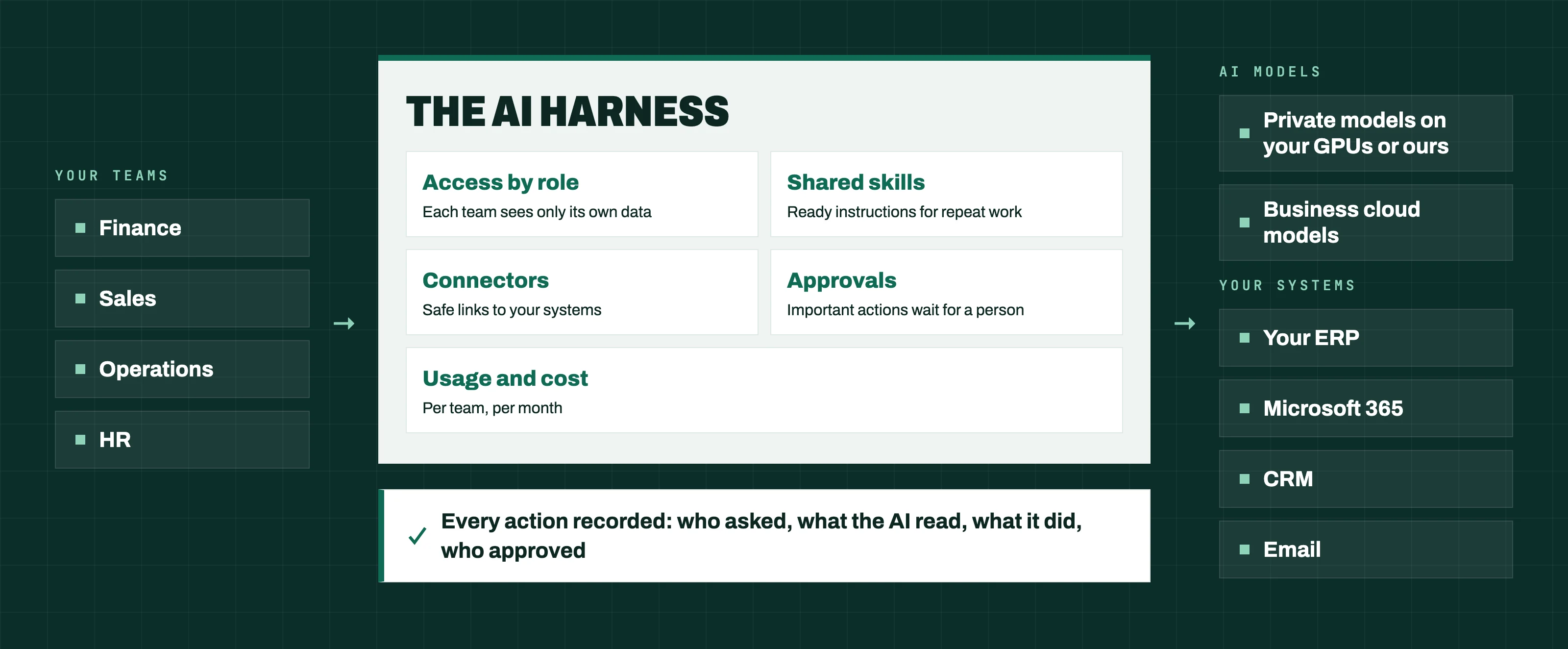
The harness and the agents run on one base
Your staff work in one place, with access set for each role. Agents act in your systems within your rules, and every step is recorded.
Your teams
- Finance
- Sales
- Operations
- HR
The harness
- Access by role
- Shared skills
- Connectors
- Approvals
- Usage and cost
Models and your systems
- AI models
- Your ERP
- Microsoft 365
- CRM
- Every action recorded
Each stage is agreed in writing before it starts
We price each stage before it begins. You can stop at the end of any stage.
01Discovery
We choose the task with you and list the systems it touches. We agree what success looks like and where a person approves. The scope is fixed in advance.
Ends withA written yes or no on going ahead, with the reasons.
02Trial agent
One agent does one task on your real data, in live use. A person approves its actions. The scope is fixed in advance.
Ends withA working agent in your code repository, with its test cases and operating guides.
03Grow and run
We add tasks one at a time. A support contract keeps each agent tested and monitored, and we fix it as your cases change.
Ends withA monthly review of each agent’s results and cost.
Questions buyers ask first
What drives the cost of an agent?
Mostly the number of systems the agent connects to and how much testing the task needs. Our FAQ page lists all five factors. We price each stage in writing before it starts, and you sign off a fixed figure.
Where does our data stay?
Where you choose: your servers, your cloud region, or our private GPUs. Our security page sets out where each part runs and what is recorded.
Which models do you use?
The one that passes your tests at the level of risk you accept. For sensitive data, that is usually an open model running privately. For work that is not sensitive, a model from a large provider can be the better choice. We build the agent so the model can be changed without rebuilding it.
What happens when an agent gets something wrong?
Important actions wait for a person, so a wrong draft is caught before it goes out. Permissions limit what any mistake can touch. Every run is recorded, so the cause can be traced to one step. The failed case joins the test cases, and every later update is checked against it.
Who owns the code?
You do. The agent, its connectors, its tests and its guides live in your repositories. Our approach page explains the handover.
Send us one task, and we will name the offer that fits
Describe the task and the systems it touches. We will reply with the offer that fits and the first stage we would propose.
Start a project